


Budget App — PocketGuard
4.51.16K Reviews
App Specs
- Version
- 5.19.3
- Updated On
- License
- Free
- Downloads
- 100,000+
- Developer
- PocketGuard, Inc.
- Categories
- Finance
- Platform
- Android
Screenshots
 Analysis by AppCompare
I like the idea behind PocketGuard’s “In My Pocket” view: instead of asking you to interpret a long list of transactions, it tries to turn your bills, goals, and everyday necessities into one practical question—how much can I spend without putting the rest of the month at risk? That makes this finance app easier to approach than a spreadsheet when I want a quick reality check before buying something. The key is to treat that figure as a guide based on the information in the app, not as permission to spend without thinking.
A spending number with a clear purpose
Many budget tools begin with categories and charts. PocketGuard’s most useful angle is more immediate: it organizes money around what is already spoken for and what may be available afterward. I find that framing helpful because “I have money in my account” and “I can comfortably spend this today” are not the same thing. Bills due later, planned savings, and routine costs can make a healthy-looking balance less flexible than it seems.
The app is made by PocketGuard, Inc., and it sits in the personal-finance space rather than trying to be a general banking replacement. Its core appeal is not that it will make financial decisions for me, but that it can make the consequences of a small purchase easier to see. If you are trying to build a habit of checking before spending, that simple pause can be more useful than a complicated set of charts you rarely open.
How I would use it during an ordinary week
I would start by reviewing the account activity and checking whether transactions have landed in sensible categories. Automatic categorization saves effort, but a merchant name does not always reveal whether a purchase was groceries, a work expense, or something else. Correcting a few misfiled items matters because the spending picture is only useful when the inputs are reasonably accurate. I would make that a short weekly routine rather than waiting until the end of the month to untangle everything.
Here is a realistic moment when the “In My Pocket” figure could help: I am out for lunch and considering an unplanned purchase on the way home. Instead of judging the decision from my bank balance alone, I can check the app after accounting for upcoming bills and the goals I have set. If the remaining amount looks tight, I can skip the extra purchase or choose a cheaper option. If it looks comfortable, I can spend without turning every small treat into a budgeting debate.
There is a useful trade-off here. A single available-to-spend figure is quick to understand, but it cannot know what I have forgotten to enter or how my plans have changed unless I keep the budget current. I would still leave a cushion for irregular costs rather than spending right down to the displayed amount. That is especially sensible around annual renewals, travel, or a month when household expenses are less predictable.
Where it differs from a spreadsheet or a bank app
A spreadsheet gives me complete control over categories and calculations, but I have to maintain it myself. A bank app is convenient for checking balances and recent transactions, yet its main view may not bring goals and future bills together in the same spending decision. PocketGuard is a middle ground: it aims to turn account activity and budget plans into a more usable day-to-day picture. That convenience is valuable if manual tracking is the reason you stop budgeting, though it may feel limiting if you want to design every calculation yourself.
Worth Reading Before You Choose

EA SPORTS FC Mobile 26 Is a Bigger Football Game, but It Takes Time

Flipboard Shows What News Apps Must Do Beyond the Feed

Switching to Android Auto Means Rethinking Your Driving Routine

Google Calendar Makes a Crowded Week Easier to Manage

Ludo King Makes the Most of the Minutes Between Plans

Baby Panda World Brings Quick Play to Modern Phones, but Its Game Library Feels Busy
The app also lets me keep separate budgets for areas such as groceries and entertainment. I would use those categories to spot a pattern, not to punish myself for one unusually expensive week. For example, if dining out is consistently crowding out a savings goal, the budget can make that tension visible; if one week is unusual, I would avoid treating it as proof that the whole plan has failed. A budget works best as feedback for the next decision, not a scorecard.
What to check before trusting the picture
Automatic sorting is convenient, but it is not the same as careful bookkeeping. A transaction can be assigned to the wrong category, and a budget built on that mistake may give a misleading impression of how much remains in a particular area. I would check unfamiliar or unusually large transactions and correct category errors as they appear. This small bit of maintenance is the price of relying on an automatic overview rather than entering every purchase by hand.
Account linking is another personal decision, not a requirement for everyone’s budgeting style. Some people prefer to connect accounts for a more consolidated view; others would rather track figures manually or use only the tools already offered by their bank. Before linking anything, I would read the current privacy and security information in the app and decide whether that setup fits my comfort level. I would not rely on an old description of a security practice as a substitute for checking the policy that applies now.
Who is likely to get the most from it
I think PocketGuard makes the most sense for someone who wants a quick spending check, has recurring bills and a few savings goals, and is willing to review categories now and then. It can also suit a budgeting beginner who finds a blank spreadsheet intimidating. People who need highly customized accounting, detailed household reporting, or a fully manual system may prefer a spreadsheet or a more specialized finance tool. If you mainly need to see a bank balance, your existing banking app may already be enough.
It is free to download, with in-app purchases listed from under a dollar to just under one hundred and fifty dollars per item, so I would explore the basic experience before paying for anything. PocketGuard has a 4.2 average from around 2,800 ratings, and it has been installed over 100,000 times. It is rated for Everyone, with a minimum operating-system requirement of version 8.0; the current version is 5.18.4. Those details make it easier to judge whether the app fits your device and expectations, but the right choice still depends on how much detail and control you personally want.
Hey there, fellow budget-conscious pals! If you’re like me, trying to keep track of all your expenses can sometimes feel like herding cats. Enter PocketGuard・Budget Planner App—your new best friend in the world of personal finance. Let’s dive into why this app might just be the solution we’ve all been waiting for.
First Impressions
When I first opened PocketGuard, I was greeted by a super user-friendly interface. It's like the app knew exactly how I like things—simple and to the point. The design is clean, with a calming color scheme that makes me feel like I’ve got my finances under control, even if that’s not always the case.
Getting Started
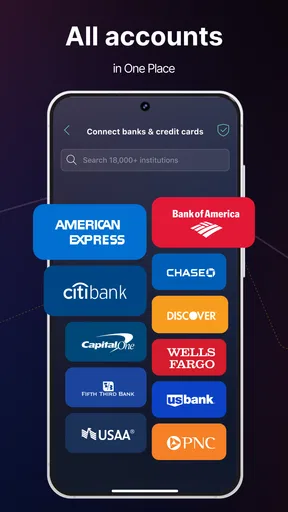
Setting up PocketGuard is a breeze. You can link your bank accounts with just a few taps, and the app starts working its magic immediately. I was pleasantly surprised by how smoothly the integration process went. It’s almost like the app gives you a virtual high-five for adulting so well.
Once your accounts are linked, PocketGuard does the heavy lifting by analyzing your spending habits. It categorizes your transactions automatically, and voila! You have a clear picture of where your money is going. This feature is a game-changer for someone like me who tends to forget where the last $20 disappeared to.
Features That Stand Out
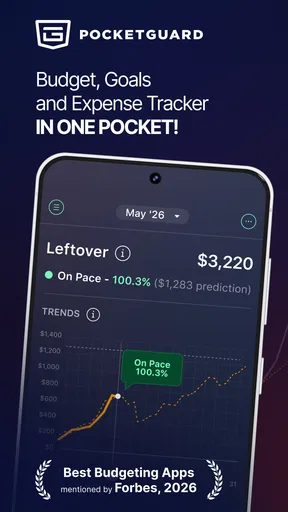
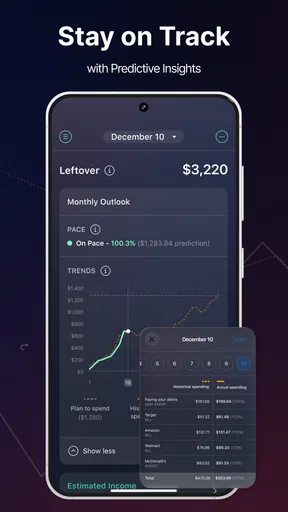
The app’s standout feature is its "In My Pocket" tool. It tells you exactly how much disposable income you have after accounting for bills, goals, and necessities. This is perfect for those times when you’re tempted to splurge on yet another coffee or that adorable pair of shoes on sale.
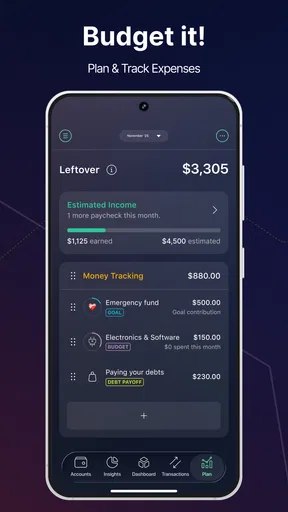
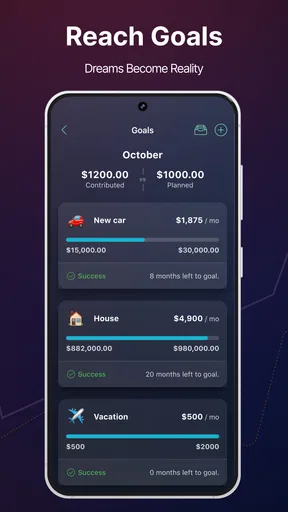
Another gem is the ability to set up multiple budgets. Whether it’s groceries, entertainment, or saving for a dream vacation, PocketGuard lets you keep tabs on all your financial goals. The app gives you gentle nudges to stay within your limits, which is helpful if you’re prone to a bit of retail therapy.
Security and Privacy
Now, I know what you might be thinking—how safe is it to link my accounts to an app? PocketGuard takes security seriously. They use bank-level encryption to protect your data, and they don’t store your bank credentials. It’s reassuring to know that your financial information is in good hands.
Room for Improvement
While PocketGuard is fantastic, no app is perfect. I did find that the automatic categorization isn’t always spot-on. Occasionally, I had to manually adjust some transactions to the correct categories. It’s a minor hiccup, but something to be aware of if you’re a stickler for details.
Also, while the free version offers plenty of features, the paid version unlocks even more tools like custom categories and detailed financial reports. If you’re serious about budgeting, it might be worth the investment, but the free version is more than sufficient for basic needs.
Final Thoughts
Overall, PocketGuard・Budget Planner App is a fantastic tool for anyone looking to get a better handle on their finances. It’s user-friendly, comprehensive, and just plain fun to use. Whether you’re a budgeting newbie or a seasoned pro, this app has something for everyone.
So, if you’re tired of losing track of your expenses or just want to save a little more each month, give PocketGuard a try. It might just be the financial sidekick you didn’t know you needed. Happy budgeting!
Pros
- User-friendly interface enhances navigation.
- Automatic categorization simplifies budgeting.
- Real-time tracking keeps finances updated.
- Customizable alerts prevent overspending.
- Secure encryption ensures data privacy.
Cons
- Limited features in free version.
- Some banks not supported for sync.
- Occasional bugs in data updates.
- No investment tracking features.
- Limited customer support options.
FAQs for Budget App — PocketGuard
What features does PocketGuard offer for budgeting?
PocketGuard provides a comprehensive suite of budgeting tools designed to help you manage your finances efficiently. Key features include tracking your income and expenses, setting up savings goals, and providing insights into your spending habits. The app also offers a unique 'In My Pocket' feature, showing the exact amount of money available for spending after bills, goals, and necessities are accounted for.
Is PocketGuard safe to use for managing personal finances?
Yes, PocketGuard prioritizes user security by employing bank-level encryption and security measures. The app connects securely to your bank accounts without storing any of your credentials on their servers. Furthermore, it uses read-only access, ensuring that no unauthorized transactions can be made through the app.
Can I use PocketGuard to track multiple bank accounts?
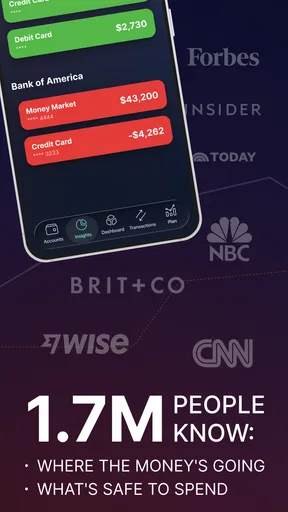
Absolutely. PocketGuard allows you to link multiple bank accounts, credit cards, and even investment accounts. This feature enables you to have a consolidated view of all your finances in one place, making it easier to track your overall financial health and make informed budgeting decisions.
Does PocketGuard offer any premium features, and are they worth it?
PocketGuard offers a premium version called PocketGuard Plus, which includes additional features such as custom categories, unlimited goals, and the ability to export data. For users who want more detailed control over their budgeting and financial planning, the premium features can be quite beneficial. However, the basic version still offers robust functionality for everyday budgeting needs.
How user-friendly is PocketGuard for new users?
PocketGuard is designed with user-friendliness in mind, featuring an intuitive interface that makes it easy for beginners to navigate. The app provides helpful guides and tips throughout the setup process, ensuring that even those new to budgeting can start managing their finances with ease. The dashboard is clean and straightforward, emphasizing important information without overwhelming the user.


